


TigerConnect
3.21.45K Reviews
App Specs
- Version
- 9.12.81
- Updated On
- License
- Free
- Downloads
- 1,000,000+
- Developer
- TigerConnect Inc
- Categories
- Medical
- Platform
- Android, iOS
Screenshots
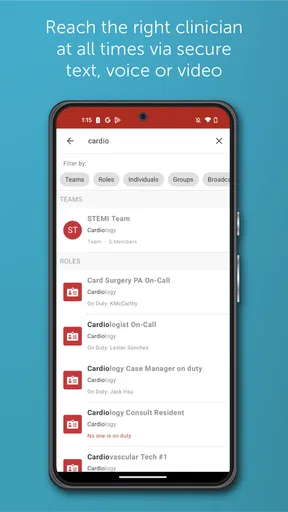
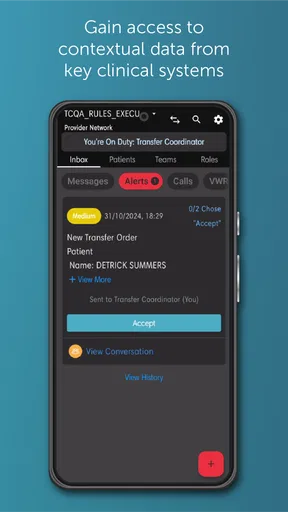
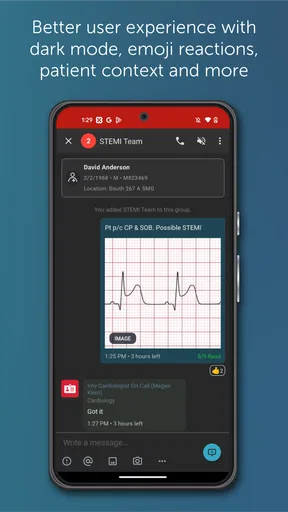
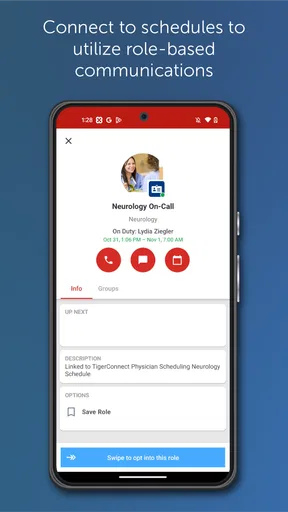
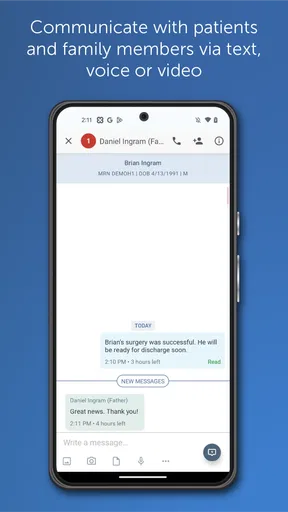
 Analysis by AppCompare
When I first looked at TigerConnect, I did not see it as a general-purpose family messenger or a medical reference tool. It is a healthcare communication app, and that distinction matters immediately. Its useful place is in a professional care setting where the right people need to coordinate around patients, rather than in a household where relatives simply want to exchange updates. I would recommend approaching it as a work communication tool with a medical focus, not as an app to install casually on every shared phone.
The app comes from TigerConnect Inc and is listed in the Medical category. It is free to download, carries an Everyone age rating, and has passed the one-million-install mark. Those details make it easy to try, but they do not make it suitable for every kind of conversation. The real question is whether your daily communication involves healthcare teams, clinical responsibilities, or an organization that already uses this service.
My overall impression is that TigerConnect is most valuable when communication needs context. A short message about a patient, a request for assistance, or a change in a care plan can become confusing when it is mixed with ordinary texts, social messages, and family notifications. A dedicated clinical communication environment can help keep work conversations in the right place. At the same time, the experience depends heavily on how the surrounding healthcare organization has configured and adopted it.
Where TigerConnect fits in real shared-use situations
I find TigerConnect easiest to assess when I start with the people who need to share information, rather than with the phone it happens to be installed on. In a household where one person works in healthcare, that means agreeing on who handles the work device and keeping clinical conversations out of family routines. That boundary also makes it easier to decide what a first useful interaction should look like.
A work device is a better match than a family phone
Imagine a nurse using a phone during a shift while coordinating with colleagues about a patient who needs attention. In that situation, a specialized communication app makes more sense than a normal texting app because the conversation belongs to a clinical workflow. The phone may be personally owned, but the communication is professional. That difference affects how I would use it, when I would open it, and who should have access to the device.
Now compare that with a household tablet shared by parents and children. TigerConnect is not the natural choice for family reminders, school scheduling, shopping lists, or checking in with relatives. The Everyone rating describes the age suitability shown for the app, but it does not turn the application into a family coordination tool. A child may be able to encounter the app, yet the intended audience is clearly people involved in healthcare communication.
For a shared device, I would keep the app inside a clearly separated work area rather than leaving it among entertainment and household apps. The practical benefit is not a special family feature; it is reducing accidental use by the wrong person. If several people pick up the same phone, a clinical message should never be treated like an ordinary notification that anyone can casually open.
Worth Reading Before You Choose

EA SPORTS FC Mobile 26 Is a Bigger Football Game, but It Takes Time

Flipboard Shows What News Apps Must Do Beyond the Feed

Switching to Android Auto Means Rethinking Your Driving Routine

Google Calendar Makes a Crowded Week Easier to Manage

Ludo King Makes the Most of the Minutes Between Plans

Baby Panda World Brings Quick Play to Modern Phones, but Its Game Library Feels Busy
This is one of the most important trade-offs I noticed: the app can support professional coordination on a device that is also used personally, but the device itself becomes part of the boundary. I would not hand a logged-in work phone to a child, lend it to a visitor, or leave it unlocked on a kitchen counter. That is sensible practice for any work communication tool, and it is especially important when conversations relate to healthcare.
One realistic day with the app
Consider a clinician moving between tasks during a busy day. A colleague needs an answer, another team member needs to be brought into a conversation, and a care-related update must reach the appropriate people. The value of TigerConnect in that moment is not entertainment or broad social interaction. It is the ability to keep those exchanges associated with clinical work instead of scattering them across personal messages, email, and verbal handoffs.
I would use it for concise coordination: state what needs attention, include the necessary context, and make the next action clear. I would avoid turning every conversation into a long stream of informal commentary. Short, focused messages are easier to follow when several conversations are active, and they reduce the chance that an important request gets buried under unnecessary replies.
A useful habit is to decide before sending a message whether it belongs in a clinical communication channel at all. If the subject is a general administrative matter, a personal appointment, or a family concern, another tool may be more appropriate. TigerConnect becomes easier to manage when it is reserved for the work it is meant to support.
What the app does not replace
I would not treat TigerConnect as a substitute for every part of clinical work. A communication app can help people reach one another, but it does not replace professional judgment, formal documentation, direct assessment, or emergency procedures. If a situation requires immediate physical intervention, I would follow the organization’s established urgent-care process rather than assuming an app message is enough.
That limitation is not a flaw unique to this product. It is a basic distinction between communication and care delivery. Still, it is easy for users to overestimate what a convenient messaging tool can accomplish. The best results come when TigerConnect is one part of a broader workflow, with staff understanding when to message, when to call, and when to act in person.
Setting up the right boundaries before use
The first setup question is not simply whether the app installs. It is who is supposed to use the account and under which organization or team. A healthcare worker should clarify that before relying on the app for work. Downloading a medical communication app independently does not automatically create the right professional network or give a user access to the conversations needed for a role.
I would also separate personal and professional identities as much as possible. A shared household device creates extra risk because another person may see notifications, open the app, or send a message from the wrong account. Even when the device belongs to one person, mixing personal and clinical communication can make it harder to recognize which messages require professional attention.
Before using the app in a busy setting, I would check a few practical points with the relevant team: who manages access, which conversations belong there, how users should respond outside working hours, and what to do if a phone is lost or shared. These are workflow questions rather than app-store features, but they determine whether the application is used responsibly.
My advice is to avoid treating installation as the end of setup. The more important preparation is agreeing on communication habits. Decide what counts as urgent, how clearly requests should be written, and how a recipient confirms that an action is understood. Without those habits, even a specialized app can produce the same confusion as ordinary messaging.
Why account boundaries matter in a household
Household use introduces a problem that is easy to overlook: the phone may be personal, but the screen is not always private. A spouse, child, roommate, or visiting relative might use the device for a completely different purpose. If TigerConnect is left signed in, the presence of a medical conversation can become visible even before anyone reads the message.
I would therefore think about the entire notification path, not just the app icon. A message preview on a lock screen, an audible alert in a shared room, or an unlocked phone left beside a family computer can expose more than the account holder intended. The safest arrangement is a device and account routine that makes it clear who is authorized to open the app.
For families supporting a healthcare worker, the most helpful approach is simple cooperation: do not borrow the work device without permission, do not respond on someone else’s behalf, and ask the account holder to handle clinical messages privately. TigerConnect does not need to become a household communication hub to be useful. In fact, keeping it separate is one of its strengths.
People looking for parental controls, family profiles, shared shopping features, or child-focused communication should choose a different category of app. TigerConnect’s medical purpose is too specific for those needs. Its presence on a shared device should be treated as a professional boundary, not an invitation for everyone in the home to participate.
Coordination is strongest when messages are deliberate
In my experience, the quality of a clinical communication app depends as much on writing discipline as on the interface. I would begin important messages with the situation and the requested action rather than assuming the recipient already knows the background. That makes the conversation easier to scan and reduces unnecessary back-and-forth.
A second useful practice is to avoid sending separate fragments when one complete message would do. Several short alerts arriving in quick succession can be harder to interpret than a single concise request. On the other hand, I would not overload a message with irrelevant detail. The goal is enough context for the recipient to act, without turning a time-sensitive exchange into a long narrative.
Another trade-off is speed versus precision. Ordinary texting often rewards quick replies, but healthcare communication can punish ambiguity. I would rather spend an extra moment checking the recipient and wording than send a fast message to the wrong conversation. That is especially important when a phone is used by more than one person or when several professional roles are active on the same device.
TigerConnect also makes more sense when teams agree on what “received” means. Seeing that a message was sent is not the same as knowing that the correct person has understood and acted on it. I would use the app as a place to coordinate, then follow the team’s established process for confirmation and escalation.
How it compares with ordinary alternatives
Compared with standard SMS, TigerConnect has a clearer professional identity. Text messaging is familiar and convenient, but it is usually mixed with personal conversations and may not reflect the structure of a healthcare team. For clinical work, that separation can be valuable. The downside is that a specialized app is only useful when the people who need to communicate are actually connected through the same organizational setup.
Email remains better for longer explanations, formal documents, and messages that do not require immediate back-and-forth. I would not choose a chat-style clinical tool simply because an email feels slower. Each medium has a different rhythm. TigerConnect is more appealing for focused coordination, while email can be easier to search, compose, and review for detailed administrative work.
General workplace chat apps may be more flexible for mixed teams or organizations that need broad project discussions. TigerConnect has a narrower purpose, which is an advantage when clinical communication is the priority but a disadvantage when a household or small business wants one app for every type of conversation. I would choose it because of the medical context, not because it is a universal replacement.
Phone calls are still the better option when tone, urgency, or complexity cannot be handled safely in a written exchange. A message can create a record of coordination, but a call may resolve uncertainty faster. The right choice depends on the situation, and I would not let the availability of TigerConnect delay direct contact when that is clearly needed.
Age rating and trust inside the home
The Everyone rating may reassure families that the app is not categorized as mature entertainment, but I would not use that label as a guide to clinical access. Age suitability and professional authorization are different issues. A young person might be allowed to have the app on a device, yet still have no reason or permission to open a healthcare worker’s account.
Trust should be based on role and consent. If a teenager occasionally uses a parent’s phone, the parent should close or protect work communication before handing it over. If an older relative shares a tablet with a healthcare professional, the same principle applies. The app’s age label does not remove the need for ordinary privacy habits.
This matters even more because the app’s subject matter can be sensitive. I would avoid discussing clinical messages aloud in front of children or visitors simply because the notification appeared at home. A household can support the user without becoming part of the user’s professional conversations.
For someone choosing an app for family coordination, I would explain this distinction plainly: TigerConnect may be safe for a broad age range to encounter, but it is not designed around family trust settings. It does not become a family app just because a household can install it. That is a reason to skip it for domestic planning, not a criticism of its medical focus.
Performance expectations and practical friction
The current version is 9.12.81, and the app supports Android 8.0 and later. That makes it accessible on many existing Android phones, although anyone using an older device should check compatibility before planning around it. A compatible operating system is only the starting point; the phone also needs to be managed in a way that suits professional communication.
The app has an average rating of 3.2 from around 5,300 ratings, with roughly 1,400 written reviews. I read that overall signal as mixed rather than disastrous. It suggests that some people find the app useful while others experience friction, and that difference may reflect the organizations, workflows, or devices involved. I would not make a purchasing decision from the rating alone, especially because the app is free to download.
One practical weakness of specialized communication tools is dependence on adoption. If only part of a team uses TigerConnect while everyone else relies on calls or email, information can become divided between channels. That is not solved by installing the app. Before committing to it, I would confirm that the intended colleagues and supervisors actually use it for the relevant work.
I would also give myself time to learn the team’s habits instead of judging the app after the first few minutes. The important question is whether messages reach the right people in a way the team can consistently understand. A polished interface cannot compensate for unclear responsibilities or a fragmented communication process.
Who should use it and who should pass
I think TigerConnect is a reasonable choice for healthcare workers whose organization expects them to communicate through it. It can also suit teams that need a dedicated place for clinical coordination and want to keep those exchanges apart from personal messaging. The app’s free price makes initial access less of a barrier, although the real value still depends on the professional environment around it.
I would be more cautious if I were an independent user hoping to create a complete medical network from scratch. The app is not automatically useful just because it is installed. Its benefits appear when the relevant people, responsibilities, and communication expectations are already aligned.
I would skip it for a family chat, a shared household calendar, school-parent coordination, or general social messaging. I would also avoid using it as the only route for urgent medical action. In those situations, a family-oriented planner, ordinary messaging app, email, or direct phone contact may be more suitable, depending on the need.
Finally, I would not recommend it to someone who wants a medical encyclopedia, symptom checker, or personal wellness tracker. TigerConnect is about communication in healthcare, not about replacing a clinician or helping a household diagnose problems. Choosing it for the wrong purpose would lead to disappointment before the first real conversation even begins.
My household verdict
After considering the shared-device angle, I see TigerConnect as a tool that benefits from separation. Keep the account tied to the correct professional user, keep the device boundary clear, and avoid treating the Everyone rating as permission for casual household access. Those habits make more sense than trying to turn the app into something it was not designed to be.
Its strongest quality is focus. A healthcare communication app can give clinical coordination a dedicated home, which is useful when ordinary texts and email are too scattered. Its main weakness is equally clear: focus also limits flexibility. People outside the intended healthcare workflow may find little reason to use it, and teams that do not adopt it consistently may gain less than expected.
With over a million installs, TigerConnect is established enough to be familiar to many Android users, but popularity should not be confused with suitability for a particular household. I would install it when a healthcare organization or team has a clear reason for using it. I would not install it merely because it is free or because its age rating looks broadly accessible.
My final recommendation is conditional but positive: use TigerConnect when professional healthcare coordination is the real need, and protect it from casual shared-device use. For that audience, it can be a practical communication layer. For everyone else, especially families searching for a general coordination app, choosing a tool built for household conversations will be simpler, clearer, and more appropriate.
Pros
- HIPAA-compliant messaging helps protect sensitive healthcare communications.
- Supports secure text
- voice
- video
- and image sharing in one platform.
- Read receipts and delivery status improve communication accountability.
- Message routing can help reach the right care team member faster.
- Works across mobile and desktop devices for flexible access.
Cons
- Most features are intended for healthcare organizations
- not casual personal use.
- Access usually depends on an employer or provider invitation.
- Advanced tools may require a paid organizational subscription.
- Frequent notifications can become distracting during busy shifts.
- Setup and integrations may require administrator or IT assistance.
FAQs for TigerConnect
What is TigerConnect used for?
TigerConnect is a secure communication and collaboration platform designed primarily for healthcare organizations. It allows doctors, nurses, care teams, administrative staff, and other authorized users to exchange messages, share updates, coordinate tasks, and communicate about patient care. Its features may vary depending on the organization’s subscription, configuration, user permissions, and connected systems, so it is best understood as a professional clinical communication tool rather than a general-purpose messaging app.
Is TigerConnect secure enough for sharing healthcare information?
TigerConnect is built with healthcare communication and privacy requirements in mind, offering security controls intended for protected and confidential information. However, the exact safeguards available can depend on the organization’s plan, policies, device settings, and administrative configuration. Users should still follow workplace procedures, use strong authentication, avoid sharing information with unauthorized contacts, and keep the application updated. No messaging platform removes the need for responsible handling of sensitive data.
Can TigerConnect replace phone calls, email, or the hospital’s other systems?
TigerConnect can reduce reliance on traditional phone calls, text messages, and scattered email conversations by providing centralized, role-based communication for care teams. It may support messaging, alerts, group conversations, and workflow coordination, but it does not necessarily replace every system used by a hospital or clinic. Whether it integrates with electronic health records, scheduling tools, or other platforms depends on the organization’s implementation and subscription.
Does TigerConnect work on both Android and iPhone?
TigerConnect is generally available for mobile devices used by supported healthcare organizations, including Android and iPhone in many deployments. Before downloading, users should check the current Google Play Store or Apple App Store listing, confirm that their device meets the operating-system requirements, and verify that their employer or healthcare organization has enabled access. Installing the app alone may not be enough because an authorized account or invitation is usually required.
Is TigerConnect free to download and use?
The application may be available to download without an upfront charge, but TigerConnect is primarily an enterprise healthcare service rather than a typical free consumer messenger. Access and features are commonly provided through a participating hospital, clinic, medical group, or other organization. Users may need an invitation, organizational credentials, or administrator approval, and some capabilities can depend on the organization’s paid plan. Check with your employer or care provider before assuming full access.


